
腾讯视频版权无法下载?海外党看国内剧、央视、咪咕视频的终极解决方案
You’re sitting in a coffee shop in New York, trying to download the latest episode of your favorite Tencent Video drama for your long flight back home—only to see the dreaded “版权限制无法下载” pop-up. Sound familiar? For overseas students, expats, and Chinese communities living abroad, this is a daily frustration. Whether it’s Tencent Video’s copyright blocks, being unable to watch CCTV live, or struggling to switch to Migu Video’s domestic version with more content, geo-restrictions are a constant barrier. The root cause? Most Chinese content platforms like Tencent, CCTV, and Migu have licensing agreements limited to mainland China, so your foreign IP address gets flagged immediately. But don’t worry—this article will break down exactly how to fix these issues, from unblocking Tencent Video downloads to accessing CCTV and Migu’s full content library, using a reliable return-to-China accelerator that checks all the boxes.
Why Tencent Video Copyright Blocks Happen to Overseas Users
Let’s get to the bottom of the “腾讯视频版权无法下载” problem. Content creators and distributors sell rights per region to protect their intellectual property. So when Tencent Video buys the rights to a drama or movie, it’s only allowed to stream or let users download it within mainland China. When you’re abroad, your device’s IP address tells Tencent’s servers you’re outside the permitted area, so it blocks access to downloads (and sometimes even streaming). For example, if you’re a student in London trying to download “Reset” for your weekend trip, you’ll hit that copyright wall every time—unless you change your IP address to a mainland one.
Can You Watch CCTV in Foreign Countries?
Yes, but not directly. CCTV’s official apps (like CCTV News) and website are geo-locked, meaning they only serve users with mainland IP addresses. So if you’re in Canada and want to watch the Spring Festival Gala live, or keep up with CCTV 5’s sports coverage, you need a way to mask your foreign IP. Many overseas Chinese try using free proxies, but they’re slow, unreliable, and often get blocked quickly. The best solution is a dedicated return-to-China accelerator that can route your traffic through a mainland server, making CCTV think you’re in Beijing or Shanghai.
How to Switch to Migu Video’s Domestic Version Overseas
Migu Video has two versions: the international one (with limited content) and the domestic one (full of exclusive dramas, sports, and variety shows). If you’re overseas, opening Migu Video will automatically redirect you to the international version—annoying, right? To switch to the domestic version, you don’t need to change any app settings. All you need is an accelerator that gives you a mainland IP. Once you connect to the accelerator, open Migu Video again, and it will detect your new IP and show the domestic version. Suddenly, you have access to all the content you loved back home, like the latest episodes of “The 99th Divorce” or live NBA games on Migu Sports.
Choosing the Right Return-to-China Accelerator: Key Features to Look For
Not all accelerators are created equal. For overseas users, here are the non-negotiable features you need to enjoy domestic content seamlessly:
Global Node Distribution & Smart Optimal Route
No matter where you are—whether it’s Los Angeles, Sydney, or Paris—you need an accelerator with a wide network of global nodes. This ensures you can always connect to a fast mainland server. Tomato Accelerator, for example, has nodes in over 30 countries, and its smart algorithm automatically picks the best route for your location. No more manually switching servers; it does the work for you.
Multi-Platform Support & Multi-Device Use
You probably use multiple devices: a phone for commuting, a laptop for streaming at home, and maybe a tablet for bed. The accelerator should work on all major platforms—Android, iOS, Windows, and Mac. Even better if it allows one account to be used on multiple devices at the same time. Tomato supports all four platforms, so your family can watch different shows on their own devices without logging out. Perfect for a family in Toronto where your kid wants to watch Tencent cartoons, your partner wants to stream CCTV news, and you want to catch up on Migu’s latest drama.
Stable Unlimited Traffic & Dedicated Lines
Buffering is the enemy of good entertainment. You need an accelerator with unlimited traffic so you don’t worry about hitting data caps mid-stream. Plus, dedicated lines for video and games ensure smooth playback. Tomato offers stable unlimited traffic, with smart traffic splitting that prioritizes your video streams over other data. Their dedicated return-to-China lines for影音 and games give you独享100M bandwidth—so even 4K content loads instantly, no lag or buffering.
Data Security & Encrypted专线 Transmission
When using an accelerator, your online activity should be safe. Free tools often lack encryption, putting your data at risk. Tomato uses encrypted专线 transmission to protect your data from hackers and snoopers. You can browse, stream, and download with peace of mind, knowing your information is secure.
Real-Time After-Sales Support
What if you have a problem at 2 AM when you’re trying to watch a live CCTV event? You need support that’s available 24/7. Tomato has a professional technical team ready to help you with any issues—whether it’s a connection drop or a problem accessing a platform. They respond quickly, so you never miss a moment of your favorite content.
Step-by-Step Guide to Using Tomato Accelerator for Your Needs
Let’s put it all together. Here’s how to use Tomato to fix your three main issues:
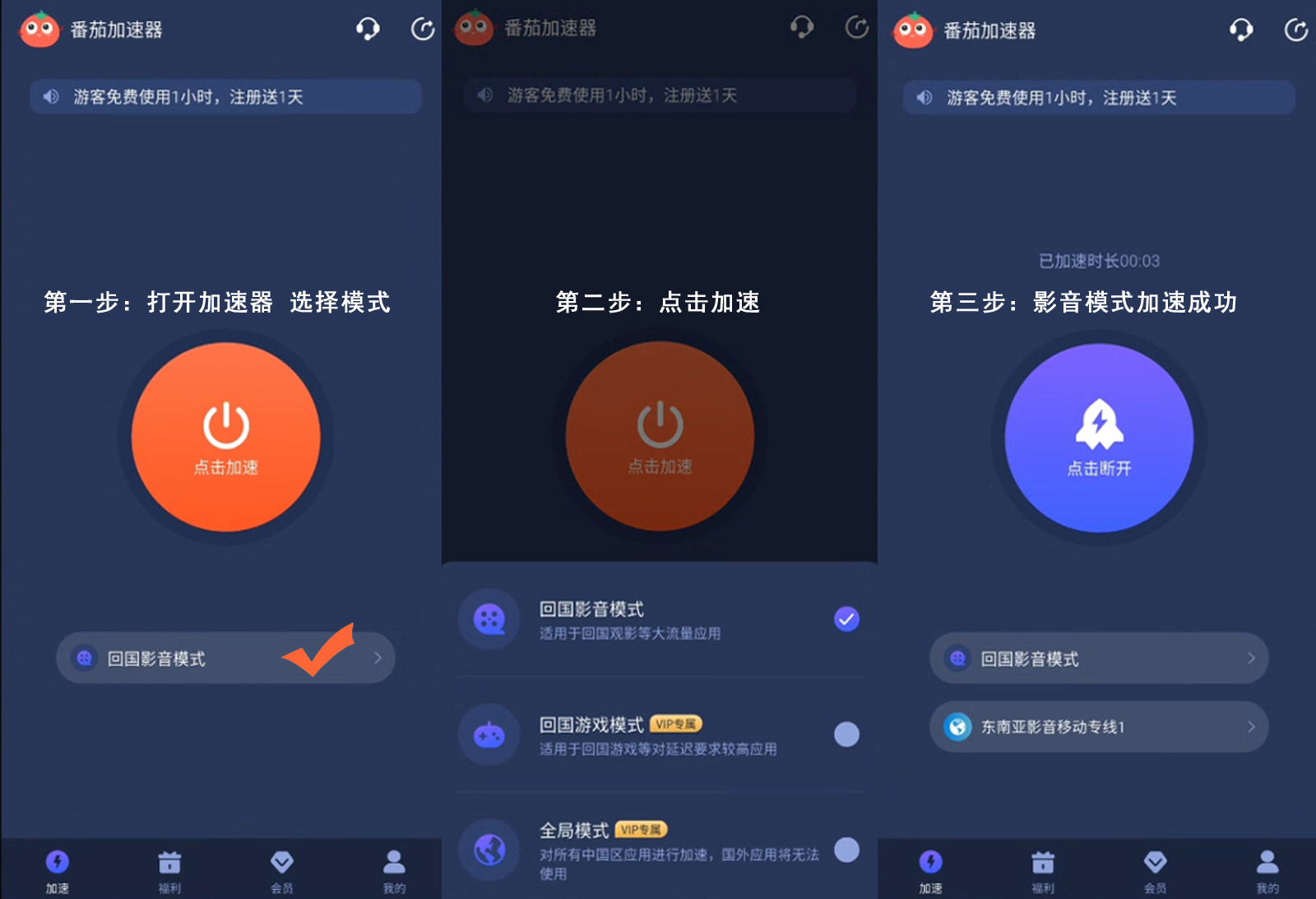
1. **Fix Tencent Video Copyright Download Issue**: Download Tomato on your device (Android, iOS, Windows, or Mac). Open the app, select a mainland China server (the app will recommend the best one). Connect, then open Tencent Video. Now you can download any content without the “版权限制无法下载” error.
2. **Watch CCTV Abroad**: After connecting to Tomato’s server, go to CCTV’s official website or open the CCTV News app. You can now stream live channels like CCTV 1, 5, or watch on-demand content—just like you’re in mainland China.
3. **Switch to Migu Video Domestic Version**: Connect to Tomato, then open the Migu Video app. The app will detect your mainland IP and automatically switch to the domestic version. Enjoy all the exclusive content you’ve been missing.
For overseas Chinese, missing out on domestic content can feel like a piece of home is gone. But with the right accelerator, you can fix the “腾讯视频版权无法下载” problem, watch CCTV live, and access Migu’s full library—all with ease. Tomato Accelerator checks all the boxes: global nodes, multi-platform support, stable unlimited traffic, dedicated lines, security, and 24/7 support. Say goodbye to geo-restrictions and hello to your favorite Chinese content, no matter where you are in the world.